

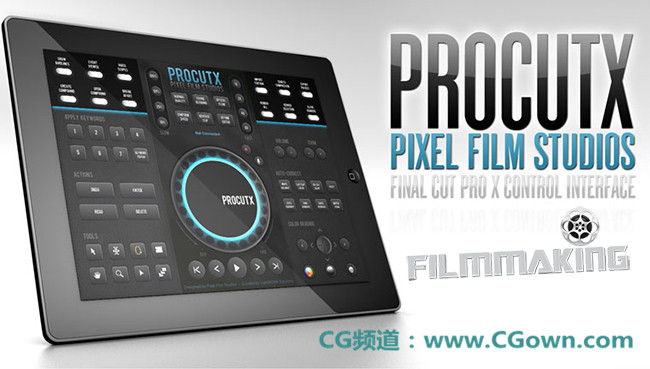
用Ipad 控制 FCP X?上的操作 来剪辑等..
PROCUTX 1.1 – Professional iPad Controller for FCPX
PROCUTX for Final Cut Pro X is an iOS iPad application that allows editors to control Final Cut Pro X on their MAC through an iPad. Designed by Pixel Film Studios and created by LightWORK Solutions Inc, PROCUTX is a powerful tool that enhances and streamlines the Final Cut Pro X editing experience.
PROCUTX currently supports Final Cut Pro X on OSX 10.7 & 10.8.
After downloading the App be sure to fill out the form on the opening screen to get the OSX component – this will allow your iPad to connect to your Mac.
Revolutionary Interface
Built from the ground up to meet the needs of today’s creative editors, PROCUTX breaks free from the menus, tabs, and shortcut keys to streamline editor’s tasks. This application gives users control over all the FCPX editing tools in one clean, fast interface, eliminating the need for clicking and searching through the Final Cut Pro X menus. From import to export, PROCUTX can speed up every step of the FCPX editing process.
Scrub the Timeline
Using the main PROCUTX interface dial in the center of the iPad screen, editors can scan the magnetic timeline in their project by dragging their finger around the wheel. By moving their finger around the precision dial, users can move the playhead frame-by-frame along the timeline. PROCUTX also has buttons that allow editors to move forward or backwards to the cut points between their clips.
Control Your Editing Tools
With the Toolbox in the bottom left and main timeline dial, users can make all of their edits using just PROCUTX. Editors can quickly select, cut, and trim their footage without ever touching the mouse or keyboard. They can also manipulate the speed of their video using the retiming buttons in the top-middle of the iPad screen.
Color Grade with PROCUTX
PROCUTX eliminates the need to click through tabs in the Final Cut Pro X Inspector to color correct images. Editors can control the Color Board’s exposure, saturation, and color using the powerful directional pad in the bottom right corner of the PROCUTX application.
Auto-Correction in a Tap
Leaving the Final Cut Inspector behind, editors can auto-correct a clip’s white balance, color, and noise removal faster than ever with designated auto-correction buttons on the right side of the PROCUTX interface.
Compound Your Clips
With the easy-to-use Compound Clip controls, users can group a complex set of elements and collapse them into a single clip just by tapping the button in the top-left corner of the PROCUTX interface. They can then open or break them apart later with the other designated buttons.
Streamline Import and Export
Using the designated buttons in the top-right of the PROCUTX application, users can take care of all of their importing, exporting and rendering needs. The fast and easy interface allows users to accept and deliver files to and from Final Cut Pro X at the push of a button.
Future Plans for PROCUTX
PROCUTX was designed to last for years of Final Cut Pro X editing to come. We already have a lot of great ideas and additions that we are working on to be featured in future updates of the application. At Pixel Film Studios, we always keep the fans wants in mind, so please send us feedback on PROCUTX features you would like to see!
【PROCUTX v1.1下载地址】
本站文章未经许可,禁止转载!
如果文章内容介绍中无特别注明,本网站压缩包解压需要密码统一是:www.cgown.com
本站资源由互联网搜集整理而成,版权均归原作者所有,仅供观摩学习,不保证资源的可用及完整性,不提供安装使用及技术服务。
若无意中侵犯到您的版权利益,请来信联系我们,我们会在收到信息后会尽快给予处理!版权说明点此了解!









0 条评论